
SONNET 2
CI and EAS Audio Processor
These support guides will help you handle and care for the SONNET 2 & SONNET 2 EAS Audio Processor.
Digital Wireless Systems
SONNET 2 offers flexible connectivity using wireless systems, such as the Roger system from Phonak. These systems use Bluetooth® and make it easy to connect to your phone, tablet, or TV. They can also be used for better listening in busy environments.
The RogerTM 21* from Phonak is a wireless receiver that was specially designed for SONNET 2. With the Roger 21, you can easily connect to wireless microphones such as the Roger Pen or Roger Table Mic. Other types of wireless receiver can be connected to SONNET 2 using the FM Battery Pack Cover.
RogerTM 21 from Phonak
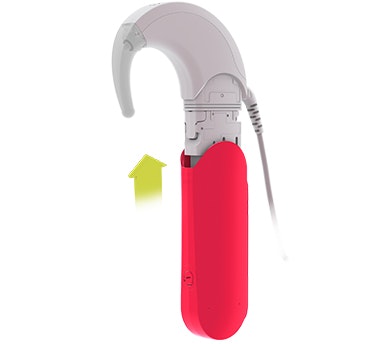
Replace standard battery pack cover with Roger 21.
Connect to wireless microphone following instructions for that specific device.

Refer to the user manual for your wireless microphone system for instructions on changing settings.
The Bluetooth® word mark and logos are registered trademarks owned by the Bluetooth SIG, Inc. and any use of such marks by MED-EL is under license.
*Roger™ is a trademark of Phonak
Other Wireless Receivers
Attach the FM Battery Pack Cover and insert the wireless receiver into the port. SONNET 2 will automatically detect sound signals as soon as the wireless receiver is activated.
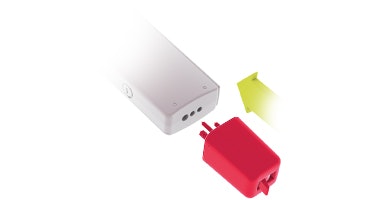
Refer to the user manual for your wireless receiver for further instructions.

Refer to your user manual for more information.

About Cochlear Implants
Find a Cochlear Implant Clinic Near You
Pros and Cons of Cochlear Implants
Cochlear Implant Surgery
How Do Cochlear
Implants Work?
What Does a Cochlear
Implant Sound Like?
Cochlear
Implants and MRI
Can I Enjoy Music With a Cochlear Implant?
Children's Cochlear Implants
Cochlear Implants for Single-Sided Deafness
Product Reliability
Data


