
OPUS 2
Audio Processor
These support guides will help you handle and care for your OPUS 2 Audio Processor.
Basic Care and Maintenance
Follow these basic and important care instructions to help improve the functioning of your OPUS 2 and extend its life.
General Cleaning
Clean OPUS 2 regularly by wiping it with a soft, damp cloth. Don’t use cleaning solutions. Use extra care when cleaning small parts such as the battery contacts.
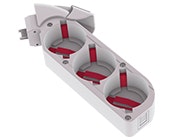
Battery Contacts
Inspect the battery contacts regularly; clean and dry them as necessary. To clean them, use a cotton swab and a small amount of rubbing alcohol. Gently wipe them dry. Avoid touching the battery contacts.
Drying
Use the drying kit every night to allow OPUS 2 to dry out completely. Remove the battery pack cover before putting it into the drying kit with your audio processor.
Please note, no disposable or rechargeable batteries should be placed in the drying kit.

Moisture
Protect OPUS 2 from exposure to water. If your audio processor gets wet, gently wipe it dry with a soft absorbent cloth.

Sunlight
Don’t leave OPUS 2 in direct sunlight, especially inside of a vehicle. Don’t expose your audio processor to extreme temperatures.

Refer to your user manual for more information.

About Cochlear Implants
Find a Cochlear Implant Clinic Near You
Pros and Cons of Cochlear Implants
Cochlear Implant Surgery
How Do Cochlear
Implants Work?
What Does a Cochlear
Implant Sound Like?
Cochlear
Implants and MRI
Can I Enjoy Music With a Cochlear Implant?
Children's Cochlear Implants
Cochlear Implants for Single-Sided Deafness
Product Reliability
Data


