
RONDO 3
CI Audio Processor
These support guides will help you handle and care for the RONDO 3 Audio Processor.
Testing the Microphones
You can use your FineTuner Echo to check that the audio processor microphones are working properly.
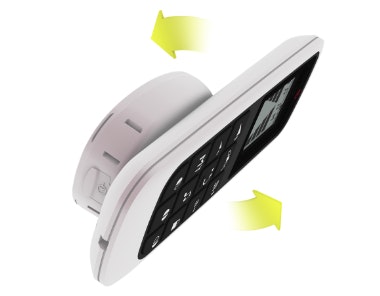
- Switch on RONDO 3.
- Place it on the back side of the FineTuner Echo.
- Speak into the audio processor microphones. The green light on the FineTuner Echo should flicker to the rhythm of your voice.
- If the green light does not flicker, adjust the volume setting on your FineTuner Echo.
- If the green light still does not flicker, charge your audio processor fully and try again.
- If your RONDO 3 is still not working correctly, contact your CI center for assistance.
!
For more troubleshooting advice, please see your user manual.

Refer to your user manual for more information.

About Cochlear Implants
Find a Cochlear Implant Clinic Near You
Pros and Cons of Cochlear Implants
Cochlear Implant Surgery
How Do Cochlear
Implants Work?
What Does a Cochlear
Implant Sound Like?
Cochlear
Implants and MRI
Can I Enjoy Music With a Cochlear Implant?
Children's Cochlear Implants
Cochlear Implants for Single-Sided Deafness
Product Reliability
Data


