
RONDO 2
CI Audio Processor
These support guides will help you handle and care for the RONDO 2 Audio Processor.
Using the Mini Battery Pack (MBP)
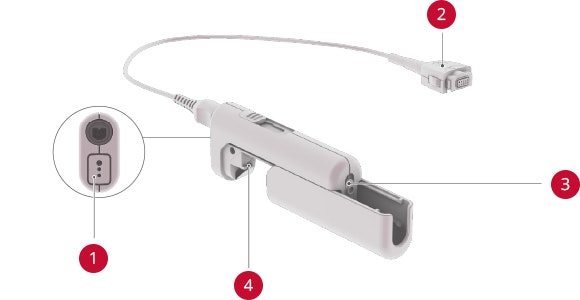
3-Pin Port
RONDO 2 Connector
On/Off Switch and Battery Compartment Lock
Battery Compartment for DaCapo PowerPack or AAA Battery
Slide off the battery compartment cover and insert a AAA battery or DaCapo PowerPack into the MBP.

Pull gently on the rubber socket cover at the bottom of the processor to open the MBP port.

Plug in the MBP cable by simultaneously pressing the release levers.
For more connectivity options, a wireless receiver, such as the Roger™* X from Phonak, can be plugged into the MBP’s 3-pin port. This makes it easy to connect to phones and other devices using wireless microphones like the Roger Pen™. A direct audio input cable can also be used with the MBP.
*Roger™ is a trademark of Phonak

Refer to your user manual for more information.

About Cochlear Implants
Find a Cochlear Implant Clinic Near You
Pros and Cons of Cochlear Implants
Cochlear Implant Surgery
How Do Cochlear
Implants Work?
What Does a Cochlear
Implant Sound Like?
Cochlear
Implants and MRI
Can I Enjoy Music With a Cochlear Implant?
Children's Cochlear Implants
Cochlear Implants for Single-Sided Deafness
Product Reliability
Data


