
SAMBA 2 GO
These support guides will help you handle and care for your SAMBA 2 GO.
Adjusting Settings
SAMBA 2 GO helps you to make adjustments of your audio processor settings, as pre-defined by your audiologist or healthcare professional.
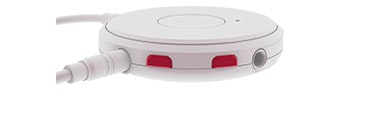
To adjust the volume, press the upper or lower volume button once to change the volume step by step. Alternatively, press and hold the button until the desired volume is reached.
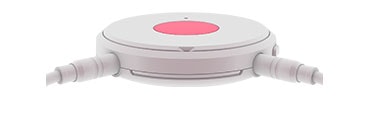
To change program, press the multi-function button for 1-2 seconds and release. Repeat until the desired program is reached.
This function is not available while audio streaming with SAMBA 2 GO.

Refer to your user manual for more information.

About Cochlear Implants
Find a Cochlear Implant Clinic Near You
Pros and Cons of Cochlear Implants
Cochlear Implant Surgery
How Do Cochlear
Implants Work?
What Does a Cochlear
Implant Sound Like?
Cochlear
Implants and MRI
Can I Enjoy Music With a Cochlear Implant?
Children's Cochlear Implants
Cochlear Implants for Single-Sided Deafness
Product Reliability
Data


