
SAMBA 2 GO
These support guides will help you handle and care for your SAMBA 2 GO.
Pairing with your Audio Processor
You only have to pair your audio processor with SAMBA 2 GO once. After that, the connection will be automatically established when both your audio processor and your SAMBA 2 GO are switched on. If you are a bilateral user, you can pair both audio processors at the same time.
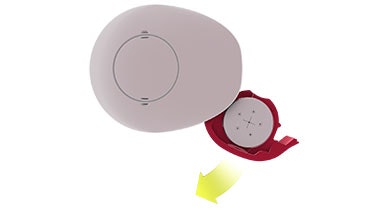
Switch off your audio processor.
Make sure your SAMBA 2 GO is switched off. Place it around your neck.
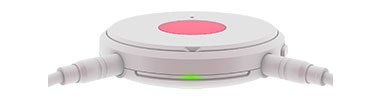
Press the multi-function button on SAMBA 2 GO until the green LED turns on. The green LED will flash while searching for audio processors nearby.
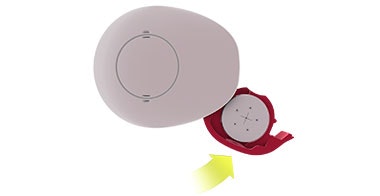
Switch on the audio processor while the green LED is flashing.
Pairing is complete when the green LED stops flashing, is illuminated for 5 seconds, and then is no longer illuminated.
During initial activation only, the blue LED will now flash to show SAMBA 2 GO is ready to be paired with a Bluetooth® device.
If you want to pair a Bluetooth device, go to “Pairing with your Bluetooth Device”.
If you don’t want to pair a Bluetooth device right now, press the multi-function button to stop the blue LED
flashing.
The Bluetooth® word mark and logos are registered trademarks owned by the Bluetooth SIG, Inc. and any use of such marks by MED-EL is under license.

Refer to your user manual for more information.

About Cochlear Implants
Find a Cochlear Implant Clinic Near You
Pros and Cons of Cochlear Implants
Cochlear Implant Surgery
How Do Cochlear
Implants Work?
What Does a Cochlear
Implant Sound Like?
Cochlear
Implants and MRI
Can I Enjoy Music With a Cochlear Implant?
Children's Cochlear Implants
Cochlear Implants for Single-Sided Deafness
Product Reliability
Data


