
SONNET
CI and EAS Audio Processor
These support guides will help you handle and care for the SONNET & SONNET EAS Audio Processor.
Changing the Microphone Cover
With Groove
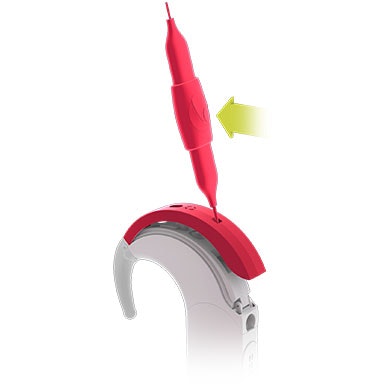
Insert the screwdriver into the groove at the bottom of the microphone cover.
Gently lever the cover away from the control unit.
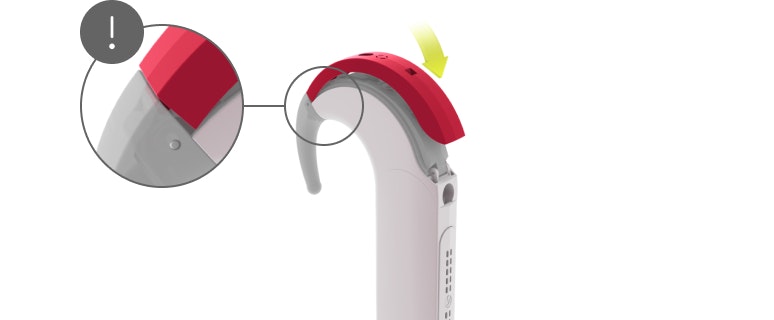
Place the new cover over the control unit.
Starting at the earhook end, press down until the cover snaps into place.
The cover should be changed every three months to maintain best possible hearing with SONNET.
Without Groove
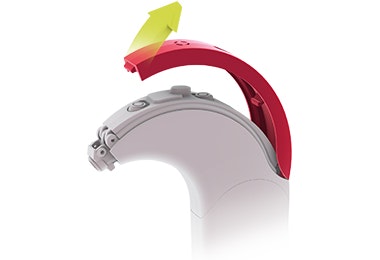
Remove the earhook.
Gently pull the microphone cover off the control unit from the front using your fingernail.
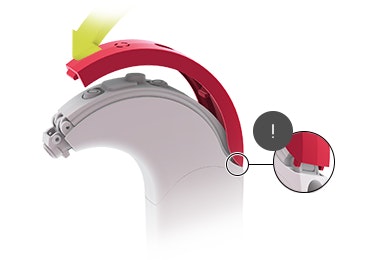
Insert the microphone cover pins into the recesses in the control unit.
Carefully snap the microphone cover onto the control unit.
Make sure that the microphone cover pins have been inserted before you proceed to step 4.

Refer to your user manual for more information.

About Cochlear Implants
Find a Cochlear Implant Clinic Near You
Pros and Cons of Cochlear Implants
Cochlear Implant Surgery
How do Cochlear
Implants Work?
What Does a Cochlear Implant Sound Like?
Cochlear Implants and MRI Safety
Can You Hear Music With a Cochlear Implant?
Cochlear Implants for Single-Sided Deafness
Product Reliability Data


