Select your Language
Please, select a language for this page

AudioLink XT
These support guides will help you handle and care for your AudioLink XT.
Charging AudioLink XT

Open the rubber socket cover.
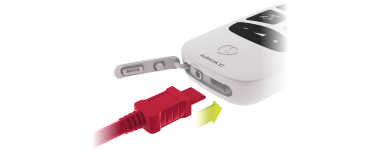
Plug the micro USB cable into the socket, or place AudioLink XT in the docking station. Plug the USB power adapter or docking station into a power outlet.

The status light will be orange while charging. When the status light turns green, AudioLink XT is fully charged.
AudioLink XT is delivered with the battery only partly charged. We recommend that you fully charge the battery before using AudioLink XT.

Refer to your user manual for more information.

About Cochlear Implants
Find a Cochlear Implant Clinic Near You
Pros and Cons of Cochlear Implants
Cochlear Implant Surgery
How do Cochlear
Implants Work?
What Does a Cochlear Implant Sound Like?
Cochlear Implants and MRI Safety
Can You Hear Music With a Cochlear Implant?
Cochlear Implants for Single-Sided Deafness
Product Reliability Data


